
Instructions for using the WildFireWeb® Content Management System
Browsing and Uploading Files
You can upload files of many types and make them available for your visitors. From text documents to Word & Excel files, to PDFs and Movies, the process is the same for each.
To browse and upload files from your computer:
Place your cursor on the page where would like to insert your file and click the File manager icon . in the editor toolbar, this opens the File manager window.
Browse your computer for the file you want to upload using the Browse button in the FileManager window.
Navigate to the file you wish to upload and select the file
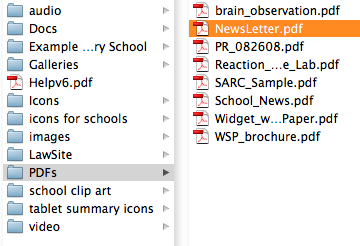
Select the file by double clicking, or highlight the file name and click "Open", or "Ok"
This places the file in the File manager Que and it is now ready to "Upload" to your storage area for use on the website.
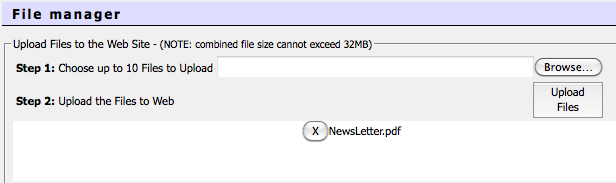
Click the "Upload Files" button in the File manager window.
This uploads the file into the currently open directory in the File manager
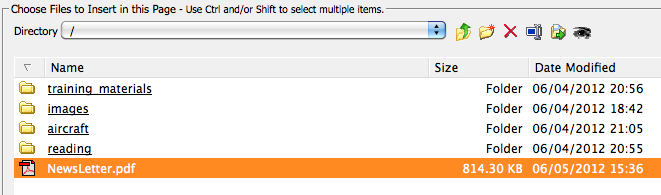
To place the file on your page,
Click once on the file to select it in the File manager window
Click the "Ok" button
Your file now appears on the page.
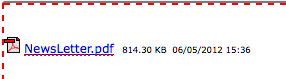
*Note that the file link has the icon of it's file type (in this example the file is a PDF) the exact name of the file and also the file size, date and time the file was placed on the page. You can choose to retain this information or select and delete the information as desired.
To browse and upload files from your computer:
Place your cursor on the page where would like to insert your file and click the File manager icon
. in the editor toolbar, this opens the File manager window.Browse your computer for the file you want to upload using the Browse
button in the FileManager window.Navigate to the file you wish to upload and select the file
Select the file by double clicking, or highlight the file name and click "Open", or "Ok"
This places the file in the File manager Que and it is now ready to "Upload" to your storage area for use on the website.
Click the "Upload Files" button
in the File manager window.This uploads the file into the currently open directory in the File manager
To place the file on your page,
Click once on the file to select it in the File manager window
Click the "Ok" button
Your file now appears on the page.
*Note that the file link has the icon of it's file type (in this example the file is a PDF) the exact name of the file and also the file size, date and time the file was placed on the page. You can choose to retain this information or select and delete the information as desired.
