
Instructions for using the WildFireWeb® Content Management System
Click the link to watch the tutorial about:  Using the Revert Tool
Using the Revert Tool
Using Revision Control (aka the Revert Tool)
Revision Control is a great tool that keeps track of the last
10 edits made to any area on your site. In addition, Revision Control allows you
to revert to a previous version of any content area if needed.
To use Revision Control:
2) Click on the Revert Tool
Voilà ! Now you can look back in time:
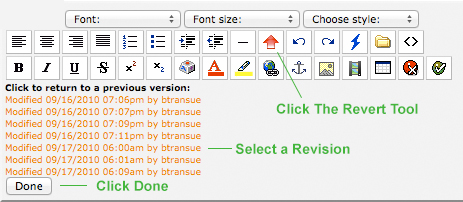
To use Revision Control:
1) Open the area you would like to revert or review the recent edits.
2) Click on the Revert Tool  .
.
Voilà ! Now you can look back in time:
3) Click on any of the links to return to a previous version.
4) Click Done to Accept the Revision change
5) Click the Save icon to save your changes
